What Type of Computer Is Best for Schools? A Cost-Effective Guide for Computer Laboratories
Choosing the best computers for a school computer laboratory is an important decision for school owners, administrators, and ICT managers. The right computers should be affordable, durable, energy-efficient, easy to maintain, and powerful enough to support teaching, learning, and computer-based examinations.
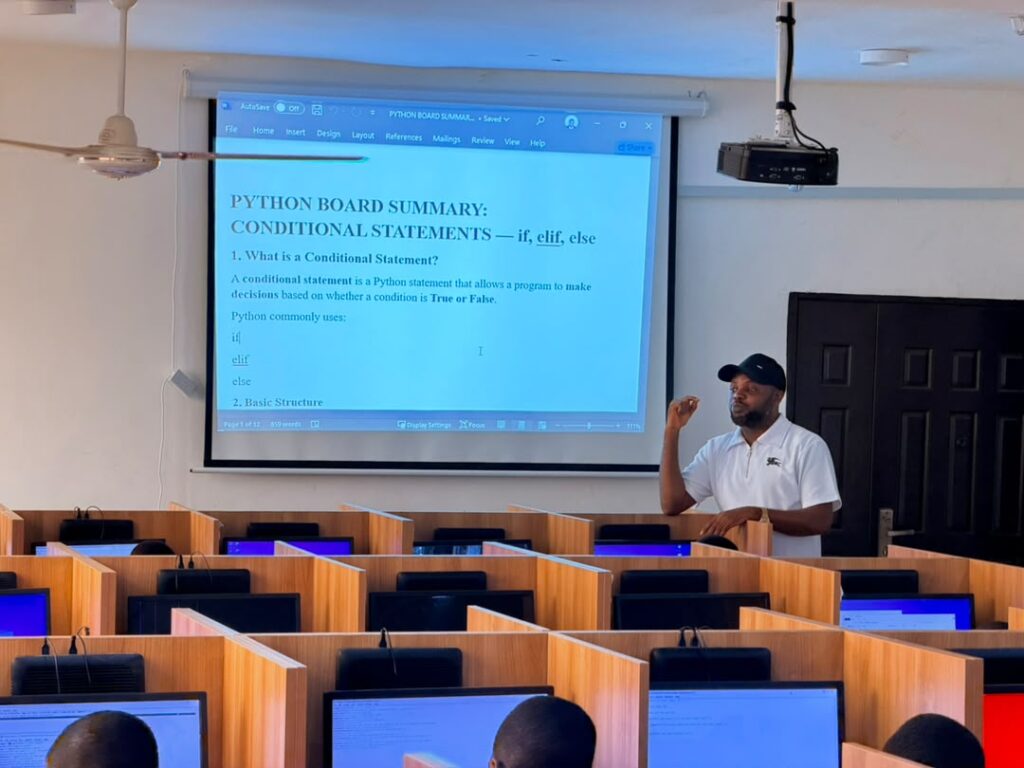
While many schools consider conventional desktop computers, laptops, and all-in-one systems, stand-alone thin clients such as the HP t620, paired with 19-inch monitors, can be a practical and cost-effective option for school computer laboratories.
At Tech Niche ICT Ltd, we help schools establish reliable computer laboratories that support ICT education, programming, internet access, and computer-based testing (CBT), while keeping equipment and operating costs manageable.
Why HP t620 Thin Clients Are Worth Considering for Schools
Electricity is a major consideration when operating a school computer laboratory, especially in Nigeria, where schools may depend on generators, inverters, or solar power systems.
HP t620 thin clients are compact devices designed for efficient computing. Their power consumption is generally much lower than that of many conventional desktop computers, helping schools reduce electricity demand when operating multiple systems.
When networked, thin clients can help schools establish computer laboratories that are more economical to operate.
This makes them worth considering for schools that want to expand their ICT facilities without placing unnecessary pressure on their electricity supply.
2. Durable Equipment for Students
School computers are used by many students throughout the day. Keyboards, mouse, cables, and other equipment can experience considerable wear and tear if the laboratory is not properly organised.
A practical advantage of the thin-client setup is its compact design. The HP t620 can be securely mounted or fixed to a desk, with the 19-inch monitor properly positioned for student use.
With the computer secured away from casual handling, there is less opportunity for students to knock it over, pull it around, or accidentally damage its connections.
Proper cable management, sturdy monitor stands or mounts, and supervised use can further protect the equipment.
For schools that need a computer laboratory built for regular student use, a well-installed thin-client setup can be a sensible investment.
3. More Affordable Than Many Conventional Computer Setups
Setting up a computer laboratory involves more than buying computers. Schools must also consider monitors, networking equipment, power supply, installation, maintenance, and future replacements.
Thin clients can provide a cost-effective alternative to purchasing a full conventional desktop for every workstation. Their compact size and lower power requirements can also help reduce some ongoing operating costs.
A school can deploy HP t620 thin clients with 19-inch monitors, keyboards, mouse, networking equipment, depending on the laboratory’s requirements.
The total cost will depend on the condition and specifications of the equipment, the number of students, software requirements, and the complexity of the network.
At Tech Niche ICT Ltd, we help schools assess their needs and select practical computer laboratory solutions that balance affordability, performance, and reliability.
4. Can Thin Clients Perform Like Normal Desktop Computers?
Yes, a properly configured thin-client workstation can support many everyday computing tasks, although its capabilities depend on the hardware, operating system, software, and network configuration.
A stand-alone thin client can run supported applications locally, while a networked thin-client environment can use a server (WAEC & JAMB SERVER) to provide shared applications, storage, or computing resources.
For school environments, an appropriately configured setup can support activities such as:
Computer appreciation and ICT fundamentals.
Word processing and spreadsheet lessons.
Internet browsing and online research.
Programming and coding lessons.
Selected educational applications.
Computer-based learning and assessments.
School administration and other supported applications.
However, not every thin-client configuration supports every application. Schools should check the HP t620’s specifications, operating-system compatibility, available memory and storage, and software requirements before purchasing.
For example, some modern applications may require newer hardware or operating systems than an older thin client can support. This is why professional assessment is important before investing in a large number of systems.
5. Can Thin Clients Be Used for WAEC and JAMB CBT?
Thin-client computer laboratories can be considered for computer-based examination environments, including those intended for WAEC and JAMB-related activities. However, suitability depends on the examination body’s current technical, security, software, and infrastructure requirements.
A school planning to use thin clients for official examinations must confirm that the proposed equipment and network architecture meet the relevant requirements before deployment.
The number of workstations must also satisfy the applicable examination capacity requirements. Having enough computers alone does not guarantee approval; other factors, including server arrangements, internet connectivity, security, power backup, and approved examination software, may apply.
For practice examinations, internal assessments, and computer-based learning, a properly designed networked laboratory can provide a useful platform.
Before purchasing equipment for an official examination centre, consult the relevant examination body and verify its current specifications and approval process.
Tech Niche ICT Ltd can help schools assess their computer laboratory requirements, plan network infrastructure, and prepare an appropriate technical setup for the intended use.
6. Why 19-Inch Monitors Are a Practical Choice
A computer laboratory does not necessarily need expensive, oversized displays for every workstation.
A suitable 19-inch monitor can provide a practical screen size for many school activities, including typing, coding exercises, ICT lessons, educational applications, and supported CBT software.
When selecting monitors, schools should consider:
Screen condition and display quality.
Resolution and compatibility with the thin client.
Available connection ports.
Mounting options and desk space.
Power consumption and warranty.
Student comfort and viewing distance.
Pairing a suitable monitor with a compact thin client creates a workstation that makes efficient use of limited laboratory space.
7. The Importance of Professional Computer Lab Networking
Buying computers is only one part of setting up an effective school computer laboratory. The systems must also be connected, configured, secured, and tested for their intended purpose.
A properly planned network can support internet access, educational software, file sharing where appropriate, centralised management, and reliable communication between workstations and the server.
The network design should account for the number of computers, expected simultaneous usage, server capacity, switching equipment, cabling, internet bandwidth, and backup power.
For schools planning to use their laboratories for examinations, testing should include the actual applications and network conditions expected during use.
At Tech Niche ICT Ltd, we provide computer laboratory setup, networking, equipment installation, and ICT support services to help schools build functional and maintainable facilities.
Why Choose Tech Niche ICT Ltd for Your School Computer Laboratory?
Tech Niche ICT Ltd helps schools identify and deploy computer laboratory solutions based on their budgets, educational objectives, and technical requirements.
Our services include:
Computer laboratory planning and installation.
Thin-client and conventional desktop solutions.
Server installation and network configuration.
Ethernet LAN cabling and connectivity.
ICT laboratory maintenance and troubleshooting.
School ICT infrastructure and CBT environment planning.
Guidance on equipment selection and power requirements.
Whether your school is setting up its first computer laboratory or upgrading an existing one, we can help you evaluate the available options and select a solution suited to your needs.
Conclusion: Make a Smart Investment in Your School’s ICT Laboratory
So, what type of computer is best for schools?
The answer depends on the school’s needs, budget, applications, and long-term maintenance plans. However, for schools looking for compact workstations, reduced electricity demand, and a potentially more affordable way to equip multiple students, HP t620 thin clients paired with suitable 19-inch monitors are worth considering.
When properly installed and configured, they can support a wide range of educational activities while helping schools organise and protect their computer equipment.
For official WAEC and JAMB examination use, always verify the current technical and approval requirements before committing to a particular system architecture.
Ready to set up or upgrade your school computer laboratory?
Contact Tech Niche ICT Ltd for professional advice on thin clients, servers, networking, and school computer laboratory installation.
Visit: https://technicheict.com
Related Article: Best Type of Computers for Schools
Explore more information to help your school choose suitable computers for teaching, learning, and computer laboratory development.
Contact Us: